


TeleGo: GPS location changer
4.360.00 Reviews
App Specs
- Version
- 3.2.11
- Updated On
- License
- Free
- Downloads
- 100,000+
- Developer
- Wonderful AI
- Categories
- Maps & Navigation
- Platform
- Android
Screenshots
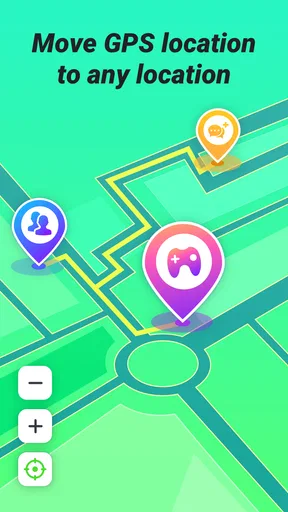
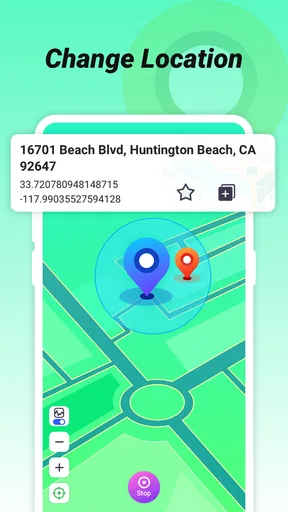
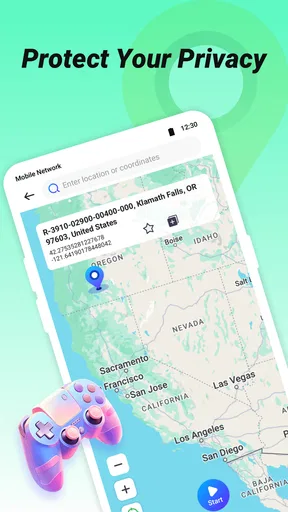
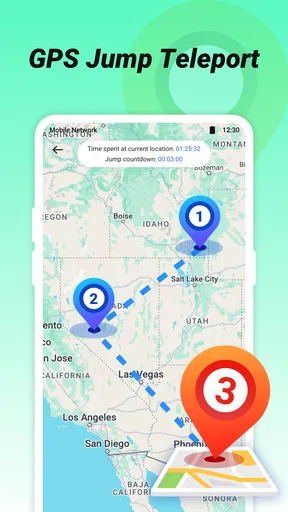
 Analysis by AppCompare
Have you ever wanted to teleport yourself to a different location without leaving the comfort of your home? Well, with TeleGo: GPS location changer, you can at least make your phone think you have! This nifty app lets you change your GPS location with just a few taps, and it's surprisingly fun—and useful too.
What a Changed Pin Can—and Cannot—Do
The useful way to think about TeleGo is as a tool for changing the location reported by your phone, not as a replacement for every part of a navigation or privacy setup. That distinction matters. A map pin can help you check how a location-based app responds somewhere else, but it does not make your device physically travel, and it should not be treated as a dependable way to bypass every service’s regional rules. I’d use it for legitimate testing or simple experimentation, and check the rules of any third-party app before relying on a simulated location there.
That expectation also helps explain why results may vary. Apps can interpret location in different ways, and some may use signals or account information beyond the GPS position. If an app continues to show your usual area, I would not assume TeleGo has failed; the other app may simply be using more than the location signal being changed. For tasks where accuracy matters—such as meeting someone, finding a nearby service, or navigating a real journey—I would return to a standard maps app and the phone’s actual location.
Why Use a GPS Location Changer?
Before diving into how TeleGo works, let's talk about why you might want to use it in the first place. Imagine wanting to access streaming content that's only available in another country, or needing to test location-based apps you're developing. There are plenty of legitimate reasons why changing your GPS location could come in handy.
Getting Started with TeleGo
Installing TeleGo is a breeze. Available for both Android and iOS, you can easily find it on Google Play or the App Store. Once downloaded, the setup is straightforward. The app guides you through the process, making it user-friendly even for the tech-challenged among us.
TeleGo is a free Maps & Navigation app from Wonderful AI. It has a 4.3 average from around 2,200 ratings, and more than 100,000 installs. It is rated for everyone, with version 3.2.11 listed for Android 6.0 and up; optional in-app purchases range from $2.99 to $19.99 per item. I would treat the free entry point as a chance to see whether its location-changing approach fits my needs before spending anything. If you only want to try one or two test locations, there is no reason to assume you need a paid option up front.
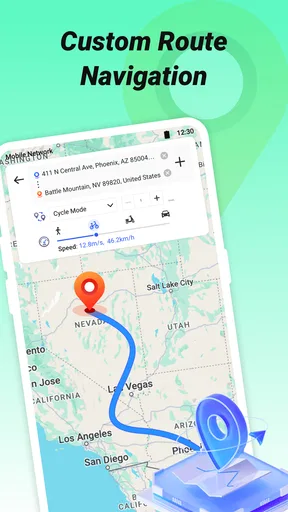
One practical setup tip is to decide what you want to check before moving the pin. For a quick experiment, choose a familiar destination and compare what changes in the app you are testing; for route work, plan the stops first. That keeps it easier to tell whether an unexpected result comes from the location choice, the target app, or the route itself. TeleGo’s navigation angle is especially relevant when a single destination is not enough and you need to think through a sequence of points.
Worth Reading Before You Choose

EA SPORTS FC Mobile 26 Is a Bigger Football Game, but It Takes Time

Flipboard Shows What News Apps Must Do Beyond the Feed

Switching to Android Auto Means Rethinking Your Driving Routine

Google Calendar Makes a Crowded Week Easier to Manage

Ludo King Makes the Most of the Minutes Between Plans

Baby Panda World Brings Quick Play to Modern Phones, but Its Game Library Feels Busy
Features That Stand Out
The app isn't just about changing locations. It offers a range of features that make it a versatile tool:
- Simple Interface: The layout is clean and intuitive, allowing you to navigate through options effortlessly.
- Customizable Maps: You can use different map views, like satellite or terrain, to pinpoint your desired location accurately.
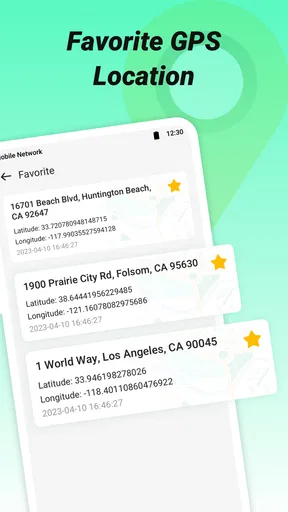
- Favorite Locations: Save your frequent spots for quick access later.
- Joystick Mode: Want to simulate movement? The joystick feature makes it look like you're walking or driving from one point to another.
The combination of saved places and simulated movement suggests a more useful workflow than repeatedly dropping a fresh pin. I would save a small set of test locations with clear names—such as a home area, a destination, and a point along a route—then reuse them when comparing how an app behaves. This is particularly handy for a developer checking whether a location-triggered screen changes at different places. It also reduces the chance of accidentally testing against the wrong spot after several map adjustments.
Multiple waypoints are most valuable when you are checking a sequence rather than merely a start and end point. For example, someone building a local discovery app could check how its results change as a user moves through several neighborhoods. The trade-off is that simulated movement is not the same as a real-world route: it cannot tell you what the streets feel like, whether a turn is safe, or what conditions are on the ground. I’d use the route tools to inspect an app’s response, not to make real travel decisions.
Putting TeleGo to the Test
Once I had everything set up, I decided to test TeleGo by "traveling" to Paris. I selected the Eiffel Tower on the map, and voilà—my phone thought I was standing right there. My weather app updated to Paris conditions, and I could access French-exclusive content. It was a hoot!
A more down-to-earth use would be preparing a location-based app for a demonstration. Say I’m checking a café finder before showing it to a colleague: I can set a location near a different neighborhood, see whether the displayed results shift, then try another point without making a trip across town. If the app supports a route with several waypoints, I can examine whether its behavior changes along the way rather than only at the endpoints. That makes TeleGo more interesting for testing than a basic one-off location switch.
For a casual user, the same process can answer a narrower question: does a particular service show different local information when the phone reports another place? I would treat that as an experiment, not a promise that the service will unlock content. A service may check account region, network location, or other signals, so changing GPS alone may not change what it displays. This is one reason I would avoid paying for extra functionality until I have tried the precise workflow I care about.
When testing a route, I’d change one thing at a time. Start with a saved location, check the target app, then add a waypoint or movement only if needed. If several settings change at once, it becomes harder to diagnose what caused a different result. This simple habit is useful for app testing and for anyone who wants to understand the limits of location simulation instead of treating it like magic.
Where It Fits Among Navigation Tools
Compared with ordinary navigation apps, TeleGo serves a different purpose. A conventional maps app is the better pick for turn-by-turn directions, live travel decisions, and finding your way using your actual position. TeleGo is more specialized: its appeal is changing the location signal and working with multiple points, which can help with testing or controlled demonstrations. I would keep both kinds of tools in mind rather than expect one to replace the other.
It also differs from simply searching for a place on a map. Looking up a destination lets you inspect it, but does not necessarily make another app respond as though your phone is there. A location changer is useful precisely when you want to see an app’s location-dependent behavior; that added control comes with added responsibility. If your goal is only to plan a real outing, the familiar mapping option is simpler and less likely to confuse your current position.
TeleGo is a better fit for someone comfortable experimenting than for someone who just needs reliable directions. The practical question to ask before installing is: do I need another app to react to a simulated location, or do I merely need to find a place? If it is the latter, standard maps are the straightforward choice. If it is the former, TeleGo’s location and waypoint focus makes more sense.
Security and Privacy Considerations
Changing your GPS location isn't without its concerns. It's important to use such tools responsibly. TeleGo respects your privacy by not storing any of your location data, which is a big plus in my book. Always ensure you're aware of the implications of spoofing your location, especially in apps that rely on accurate GPS data.
I would also keep the purpose narrow and transparent. Simulated location can be useful for checking software or illustrating how a location-aware feature works, but it can create problems if used to mislead a person or service. It is not a substitute for telling someone where you actually are, and it should not be used when a third party depends on your genuine location for safety or trust. That boundary is more important than any convenience the app offers.
If you are unsure whether a particular service permits a changed location, check its own rules before using TeleGo with it. The same caution applies to accounts and content access: a changed GPS reading does not guarantee that a service will treat you as being somewhere else. I would also switch back to my real location when finished, especially before using regular navigation or location-based services, so a test does not carry over into an everyday task.
The Bottom Line
In the end, TeleGo: GPS location changer is a robust tool for both casual users and developers. Whether you're trying to access geo-restricted content, test apps, or just want to have a bit of fun, TeleGo delivers a seamless experience. It's a well-designed app that does exactly what it promises, and does it well.
So, if you've ever wondered what it would be like to explore the world from your living room, give TeleGo a shot. Just remember to use your newfound powers wisely!
My recommendation is strongest for curious users and developers who want to test how location-sensitive software reacts without physically moving between places. It is less compelling if you need dependable everyday navigation, expect every service to accept a simulated position, or want a guaranteed way around regional restrictions. In those cases, a regular maps app—or simply using the service from your actual location—is the more sensible choice.
For the right person, the appeal is not just the novelty of appearing somewhere else. It is the ability to set up a repeatable location check, save useful spots, and explore a route with more than one point. Go in with realistic expectations, test the exact use case that matters to you, and keep real-world travel decisions separate from simulated ones. That is how I would get the most value from TeleGo without mistaking a handy testing tool for a complete navigation solution.
Pros
- Easy to use interface for quick location changes.
- Supports a wide range of global locations.
- Works seamlessly with most apps.
- Allows favorite locations for quick access.
- No need for device rooting.
Cons
- May drain battery faster than usual.
- Some apps may detect location spoofing.
- Limited free version features.
- Requires stable internet connection.
- Occasional app crashes reported.
FAQs for TeleGo: GPS location changer
What is TeleGo: GPS Location Changer used for?
TeleGo: GPS Location Changer allows users to simulate their GPS location to appear as if they are in a different place. This can be useful for enhancing privacy, testing location-based apps, or accessing geographically restricted content. Users can effortlessly switch between locations with a user-friendly interface.
Is using a GPS location changer legal?
While TeleGo itself is a legitimate app, the legality of using a GPS location changer varies by jurisdiction and intended use. Users should ensure compliance with local laws and terms of service of other apps that might restrict location spoofing, such as gaming or streaming apps.
Does TeleGo affect other apps on my device?
TeleGo may impact apps that rely on GPS for functionality, such as navigation apps or location-based services. While it can help access restricted content, it might disrupt services like maps if not configured correctly. Always ensure that you revert to your actual location when using such apps.
Is TeleGo safe to install and use?
TeleGo is generally safe to install if downloaded from reputable sources like the Google Play Store or Apple App Store. However, users should exercise caution and avoid third-party sites. Always check for app permissions and reviews to ensure it meets security standards.
Do I need to root or jailbreak my device to use TeleGo?
No, TeleGo does not require rooting or jailbreaking your device. It is designed to work on standard Android and iOS devices without the need for advanced modifications. This makes it accessible for most users while maintaining device integrity and security.


